Clip 1Fantasy scene
AI video generator app for iOS and Android VIBE AI Video

VIBE AI VideoVIBE AI Video Generator App for iOS and Android using Veo 3.1, Sora 2, and Seedance 2.0
VIBE is an AI video generator app that lets you create stunning videos from text prompts or images using the latest AI models like Kling, Sora, and Veo.
- Create videos from text prompts in a few taps
- Turn images, product shots, and still frames into short videos
- Use Veo 3.1 Fast, Sora 2, Seedance 2.0, Kling 3.0, and more in one app
Text to videoImage to videoVeo 3.1, Sora 2, Seedance 2.0iOS + Android
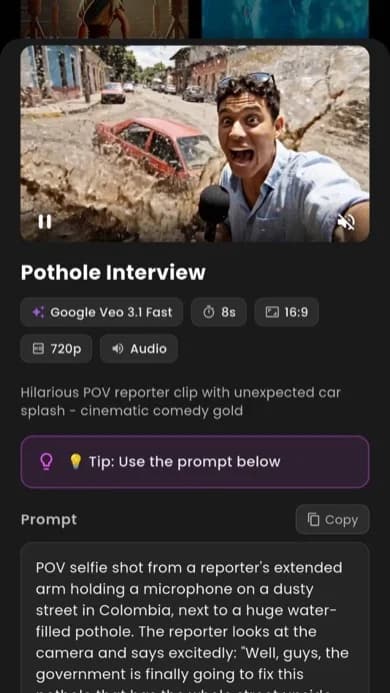
Real app previewSee VIBE AI Video in action
Vertical examples
Create AI Videos within seconds
Create the exact AI video you want from a quick prompt or image, test it across the latest models in one place, and keep moving with new looks and model updates as soon as they land.
Testimonials
What people say after using VIBE
People download VIBE because they want a faster way to make strong clips. The feedback is usually the same: less friction, better variety, and more videos that actually feel ready to post.
4.9/5from creators, marketers, and founders using VIBE every week

Maya R.
UGC creator
“I tried a lot of apps before this, but VIBE is the first AI Video Generator that actually feels good on mobile. I can move from a random idea to a clip I want to post without overthinking every step.”

Noah T.
Growth marketer
“For quick launches and ad tests, this is the AI Video Maker I keep coming back to. It is fast, the model choice is real, and I can test several directions before the team even opens the bigger editing tools.”

Lena P.
Short-form editor
“What I like most is how easy it is to create AI videos when the idea is still rough. I can write the scene, switch the model, rerun it, and get to something watchable way faster than my old workflow.”

Jay K.
Solo founder
“VIBE feels like an AI Video Creator for people who do not want a bloated setup. I use it for landing page visuals, product teasers, and quick social clips when I need motion but do not have time for a full production pass.”

Sofia D.
Creative strategist
“Sora 2 gives me the moodier, more cinematic look I want for concept pieces, and Seedance 2.0 is great when I want motion to feel sharper and more active. Having both in one app saves me a ridiculous amount of time.”

Eli M.
Product creator
“Kling 3 has been especially good for product shots and cleaner movement. I can test hooks, tighten the opening frame, and get something that feels polished enough to ship the same day.”
What VIBE is
What is VIBE AI Video Generator?
VIBE AI Video Generator is designed for people who want a clear, mobile-first way to turn text prompts and images into videos that feel ready to post.
VIBE AI Video Generator is for people who do not want to wrestle with five different tools just to make one strong clip. You open the app, describe the scene you want or upload an image, choose the model that matches the look, and let the app handle the heavy lift. The experience is built to feel direct, visual, and current.
That matters because most people looking for an AI Video Maker are not trying to become technical experts. They want a fast way to build story clips, product videos, social edits, trend-driven short-form content, or cinematic experiments without losing the original spark of the idea. VIBE keeps that process simple while still giving users real range.
If you are comparing tools, the biggest difference is that VIBE AI Video Generator works like an AI Video Creator made for mobile behavior. You can test an idea quickly, switch models without leaving the app, and keep generating until one version feels right. That is a much better experience than forcing every video through the same rigid workflow.
Made for quick ideas
VIBE AI Video Generator is built for people who want to move from idea to clip fast. You can test a visual thought while it still feels fresh instead of getting stuck in setup.
One app, more range
This AI Video Maker puts multiple models inside one mobile workflow. That means less tab switching, less tool fatigue, and more room to compare styles without losing momentum.
Text and image friendly
Some days you start with a prompt. Other days you start with a still image, product shot, or mood frame. VIBE AI Video Generator supports both paths in a way that feels natural.
Built for posting
The goal is not abstract “AI content.” The goal is real clips people can share on TikTok, Instagram Reels, YouTube Shorts, landing pages, and campaigns.
Why people choose VIBE
Why VIBE AI Video Generator works better than juggling random tools
The strongest AI video workflow is usually the one that keeps you moving. VIBE is built to reduce friction, not add another layer of complexity.
A cleaner mobile workflow
People searching for an AI Video Maker usually want one thing: speed without chaos. They want to open an app, test an idea, see a strong result, and either post it or improve it. They do not want to spend half their time figuring out where each piece of the workflow belongs.
VIBE AI Video Generator gives you a simpler structure. The prompt lives next to the output. The model choice is part of the same decision. The path from first idea to final clip stays obvious. That is why it feels more like a real creative app and less like a collection of disconnected features.
That clarity also helps with consistency. When you want to post often, you need a workflow you can repeat. VIBE gives users an AI Video Creator that supports fast iteration, multiple looks, and a mobile-first rhythm that matches how short-form content is actually made now.
You stay in one flow
A lot of people try to build video ideas by bouncing between prompt tools, image tools, editing apps, and export tools. VIBE AI Video Generator cuts that mess down. You can build, compare, and refine inside one cleaner experience.
It feels current, not dated
The point of an AI Video Creator is not just to generate motion. It should help you make something people actually want to watch right now. VIBE is shaped around the speed and style of short-form content, fast ideation, and visual experimentation.
You get model choice without the chaos
Different ideas need different looks. A realistic scene, a dreamy story clip, a high-energy social post, and a product video should not all be forced into one style. VIBE AI Video Generator gives you access to multiple top models without turning the app into a confusing control panel.
It works for creators and brands
Some users want daily posts. Some want ad concepts. Some want music visuals, animated product shots, or quick story scenes for a campaign. VIBE AI Video Generator is flexible enough for all of that while staying easy to pick up.
How it works
How the VIBE AI Video Generator works
The whole point is clarity. VIBE keeps the path from idea to video simple enough that you can focus on the scene, the style, and the final result.
Start with a prompt or image
Open VIBE AI Video Generator and decide how you want to begin. If the idea is already in your head, write it as a text prompt. If you already have a still frame, product shot, photo, or mood image, upload it and build from there.
Choose the model that fits the vibe
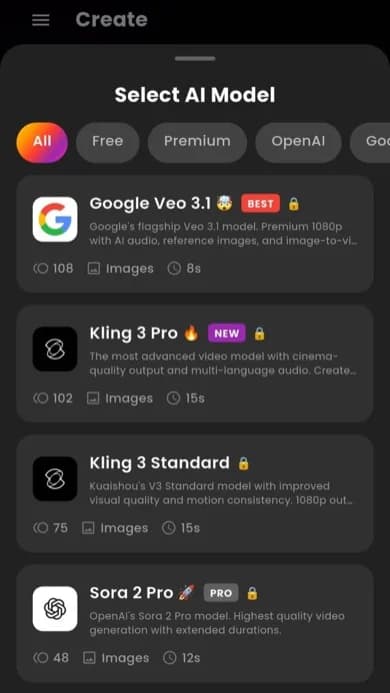
Not every idea should look the same. Pick Kling 3, Sora 2, Google Veo 3.1 Fast, Seedance, WAN, or Grok Imagine based on whether you want speed, realism, mood, movement, or something more unexpected.
Generate, review, and try again fast
Once the first version is ready, keep going. Tighten the wording, switch the model, or change the opening frame. A strong AI Video Maker should make iteration feel easy, not expensive in time and attention.
Why this flow feels easier
Speed matters most when it feels useful. Here, that means you can go from an idea to a usable result while the idea still feels alive. That is why VIBE AI Video Generator works for creators, founders, marketers, editors, and teams who need momentum.
The easier the workflow feels, the more likely people are to keep testing, improving, and posting. That is one of the biggest reasons an AI Video Creator becomes part of someone’s real routine instead of feeling like a novelty they try once and forget.
Quick rules for better clips
- Short prompts often beat overstuffed prompts.
- A strong first frame usually makes the whole clip feel better.
- Testing two models on the same idea is often smarter than writing one massive prompt.
- Good short-form content usually comes from fast iteration, not waiting for one perfect run.
Text to video
Create videos from text with this AI Video Maker
Text to video is still the fastest way to turn a rough idea into something visual. You describe the scene, the mood, or the movement, and VIBE turns that into a video direction you can keep improving.
This is where VIBE AI Video Generator feels especially strong. A good AI Video Maker should not force you to write in a robotic way. You should be able to type a concept the way you naturally think about it: a roller coaster falling into a volcano, a dragon made of fire over a frozen fjord, a singer at a piano, or a surreal city moment that would be impossible to film on demand.
That matters for creators because the first version is rarely the final one. The real value is being able to test a prompt, watch the direction, and decide what to adjust next. Maybe the movement needs more drama. Maybe the framing should feel tighter. Maybe the same prompt needs a different model to look more realistic, more cinematic, or more unexpected.
VIBE AI Video Generator makes that loop fast. Instead of treating text to video like a single one-shot generation, the app treats it like a creative conversation. That is exactly what most people want from an AI Video Creator: room to explore without turning every prompt into a long technical exercise.
- Write a scene in plain language and let the app build the motion around it.
- Test one idea across multiple models without leaving the same workflow.
- Shape the mood for social content, product videos, fantasy clips, music visuals, and ad concepts.
- Use fast iteration to find the version that feels watchable, not just technically correct.
Image to video
Turn images into motion with this AI Video Creator
Some ideas already have a frame. A product shot, a still portrait, an illustrated world, or a single dramatic scene can be the start of a video instead of the end of one.
That is why image to video matters so much. It lets people take a still visual and turn it into something that feels alive. VIBE AI Video Generator makes this process simple enough for everyday use, whether you are working with social content, paid creative, concept art, product visuals, or a personal idea you want to explore.
A strong AI Video Creator should not make image-based video feel locked to one outcome. It should give you different paths. One version might feel cinematic and realistic. Another might feel bigger, weirder, or more intense. That flexibility is part of what makes VIBE useful for both creators and teams. You are not only animating an image. You are choosing what kind of motion story the image becomes.
The alien ship scene in this section is a good example. A single still concept can become an entire moment with scale, tension, atmosphere, and movement. That is the promise of image to video when the workflow is good: you start with one frame, but the result feels much bigger.
- Use a product photo to create motion for ads and landing pages.
- Turn concept art or mood frames into short cinematic clips.
- Bring travel shots, portraits, or still scenes to life with a clearer sense of movement.
- Create alternate looks fast by switching the model instead of rebuilding everything from zero.
AI models
AI models inside VIBE AI Video Generator
One of the biggest reasons people download VIBE is simple: different ideas need different visual energy. The app gives you real choice without making model selection feel confusing.
Why model choice actually matters
People often ask which model is best. The better question is which model fits the clip. An AI Video Maker becomes much more useful when users can match the tool to the intention. A grounded product shot, a surreal short-form idea, a fantasy action scene, and a fast social test all need different strengths.
VIBE AI Video Generator gives you that range inside one app. Instead of sending people away to compare outputs across separate platforms, VIBE keeps the creative decision in one place. That makes the app easier to trust and easier to recommend when someone asks for an AI Video Creator with real flexibility.
That also means people looking for a Sora 2 AI Video Generator, a Veo 3.1 Fast Video Generator, a Kling 3.0 AI Video Generator, a Seedance 2.0 AI Video Generator, a Pixverse 5.6 AI Video Generator, a WAN 2.6 AI Video Generator, a Hailuo AI Video Generator, an LTX 2 AI Video Generator, or a Luma Ray Flash 2 Video Generator can explore those model styles in one app instead of bouncing between different tools.
The cheapest and best AI Models - try them now in VIBE Video AI
Sora 2Google Veo 3.1Google Veo 3.1 FastSeedance 2.0Kling 3.0Kling o3Pixverse 5.6WAN 2.6HailuoLTX 2Luma Ray Flash 2Grok Imagine
Sora 2 AI Video Generator
Sora 2 AI Video Generator is a strong option when a clip needs atmosphere, story energy, and a more cinematic sense of world. It works well for scenes that should feel immersive, dramatic, or emotionally charged instead of flat.
Veo 3.1 AI Video Generator
Veo 3.1 AI Video Generator is a strong choice when you want a more premium visual finish, better scene control, and a polished cinematic feel. It is useful for creators who want higher-end results without leaving the app.
Veo 3.1 Fast Video Generator
Google Veo 3.1 Fast Video Generator is useful when speed matters. It is a smart pick for quick tests, rapid prompt iteration, and creators who want to compare multiple directions fast before choosing a final version.
Seedance 2.0 AI Video Generator
Seedance 2.0 AI Video Generator is built for motion-heavy ideas. If the clip needs rhythm, movement, transitions, or a more kinetic visual feel, this model is often one of the most interesting paths to try.
Kling 3.0 AI Video Generator
Kling 3.0 AI Video Generator is a strong pick when you want motion that feels grounded and visual detail that stays clean. It works well for scenes that need a realistic look, cinematic tension, or a polished commercial feel.
Kling o3 AI Video Generator
Kling o3 AI Video Generator is a good option when you want sharper visual intelligence, stronger scene decisions, and another high-end direction for more advanced prompt ideas. It gives users another serious model lane inside VIBE.
Pixverse 5.6 AI Video Generator
Pixverse 5.6 AI Video Generator is a useful choice when you want stronger visual punch, stylized energy, or scroll-stopping short-form content. It can be a great fit for bold edits, trend-driven clips, and high-impact social visuals.
WAN 2.6 AI Video Generator
WAN 2.6 AI Video Generator is strong when you want to explore alternate visual directions. It is helpful for experimenting with style, structure, and unexpected prompt outcomes without making the workflow feel complicated.
Hailuo AI Video Generator
Hailuo AI Video Generator is useful when you want a softer, more expressive visual tone or another creative angle on the same prompt. It gives users a different lane to test when realism alone is not the main goal.
LTX 2 AI Video Generator
LTX 2 AI Video Generator is helpful when you want efficient prompt testing and a clean path to short concept clips. It is another strong model for creators who want more variety without leaving the app.
Luma Ray Flash 2 Video Generator
Luma Ray Flash 2 Video Generator is a strong option for speed, clean movement, and fast visual drafts. It works especially well when you want to test several hooks, scene setups, or social-ready concepts in a short time.
Grok Imagine AI Video Generator
Grok Imagine AI Video Generator is the choice when you want something bolder, stranger, or more playful. It gives users another creative lane inside VIBE AI Video Generator instead of forcing every idea into a safe look.
Who it is for
Who should use VIBE AI Video Generator?
VIBE works best for people who want to publish more visual ideas with less friction. That can mean creators, small teams, brands, or anyone trying to build a faster content habit.
Creators chasing consistency
If you want to post more often without every video becoming a full edit session, VIBE AI Video Generator fits that routine well. It gives creators a faster way to move from idea to draft to postable clip.
Brands testing paid and organic ideas
Marketing teams can use VIBE as an AI Video Maker for concept tests, product hooks, launch moments, visual moodboards, and short ad directions before committing to bigger production.
Founders and solo operators
When you need content but do not have a full creative team behind you, the app helps fill the gap. It is useful for landing pages, store launches, offers, demos, and social content that needs motion.
Anyone who wants a cleaner creative loop
Some people simply want an AI Video Creator that feels intuitive. They want to test ideas, compare looks, and keep the good version. That is exactly the kind of workflow VIBE is built around.
An AI Video Maker built for TikTok, Reels, and Shorts
Short-form is one of the clearest reasons people look for an AI Video Maker in the first place. They want quick concepts, eye-catching scenes, strong opening frames, and a workflow that keeps up with how fast mobile content moves. VIBE AI Video Generator is well suited to that rhythm.
- Vertical-first ideas for TikTok, Instagram Reels, and YouTube Shorts
- Fast clip testing for trend-driven social content
- Visual hooks that help stop the scroll earlier
- Prompt-led storytelling for short attention spans and mobile viewing
Prompt ideas
Prompt ideas you can try in VIBE AI Video Generator
The easiest way to understand an AI Video Creator is to see the kinds of ideas it can handle. The examples below come from scene concepts that are visual, clear, and instantly engaging.
Prompt quality matters, but not in the way people sometimes think. You do not need to sound like a machine. You need to sound specific. The better path is usually to describe the subject, the setting, and the type of movement you want. VIBE AI Video Generator works best when the idea feels easy to picture. That is why strong prompts often read like clean scene directions instead of long blocks of jargon.
This is also where an AI Video Maker becomes more fun to use. Once you know how to frame ideas, you can move between realistic scenes, fantasy visuals, music moods, and social-ready concepts without changing the basic workflow. The goal is not to memorize a system. The goal is to get good enough at prompt writing that your creative ideas start turning into clips faster.
Volcano roller coaster
A great example of why text to video is exciting. One prompt can create scale, danger, motion, sound, and a full cinematic payoff in seconds.
Prompt: First-person POV of a roller coaster plunging into the mouth of an erupting volcano, spiraling through lava and blasting into a glowing sunset above the clouds.
Lego jungle chameleon
This kind of idea shows how playful prompts can still feel polished. It mixes texture, color, movement, and a strong visual identity without needing technical language.
Prompt: A dense jungle world built from tiny lego-like pieces, with a rainbow chameleon running through the scene while the camera drifts in and out of focus.
Piano performance
Not every strong clip needs chaos. A quiet performance prompt can create mood, intimacy, and emotion. That makes VIBE useful for music, atmosphere, and storytelling content too.
Prompt: He sings and plays the piano in a softly lit performance space with cinematic focus and an intimate music-video mood.
Penguin mountain walk
A simple prompt can still land hard if the visual idea is clear. Direction, distance, and mood are enough to make the scene feel watchable and memorable.
Prompt: A penguin walks away from the camera toward a huge snowy mountain in the distance, framed as a calm cinematic adventure moment.
Simple prompt habits that help
Lead with the subject, then name the setting, then describe the movement.
If you want a stronger result, change one thing at a time instead of rewriting everything.
A clear emotion or visual mood usually improves the clip more than adding extra adjectives.
If you are posting short-form content, focus on the opening image first. That is often the part that decides whether people keep watching.
FAQ
Frequently asked questions about VIBE AI Video Generator
If you are deciding whether VIBE fits the way you like to make videos, these are the questions people usually want answered first.
VIBE is an AI video generator app that lets you create stunning videos from text prompts or images using the latest AI models like Kling, Sora, and Veo. It is built for people who want a faster way to create clips for social content, product videos, story scenes, and everyday creative ideas on iPhone and Android.
Download the appVIBE AI Video Generator
VIBE AI Video GeneratorDownload VIBE AI Video Generator and start making clips that actually move
If you want an AI Video Maker that feels modern, clear, and fast on mobile, VIBE is the app to try. Start with text to video or image to video, test ideas across Kling 3, Sora 2, Google Veo 3.1 Fast, Seedance, WAN, and Grok Imagine, and keep the version that feels ready to post. VIBE AI Video Generator is built to help you create more without turning every idea into a project.
Text to video in one mobile workflow
Image to video with multiple model choices
Built for TikTok, Reels, Shorts, and ads